Showing posts with label Silhouette America. Show all posts

Thursday, May 9, 2024

Create Score Lines with Embossing Tool on the Cameo 5

 How to Create Score Lines on the Silhouette Cameo 5

Today's inspiration comes from Lisa Curcio of Lisa's Stamp Studio. I recreated her pleated paper card template by taking a screenshot of her pdf and importing it into my Silhouette Design Studio to access as I was creating. In this lesson I am focusing on how to create those score lines, but this is a peek how I saved the completed file to my Silhouette Library for easy cut access later.


I encourage you to check out Lisa's Stamp Studio for more inspiring card ideas and helpful templates to streamline your card making process. Her content is perfect for both beginning and experienced card makers alike.

Watch my YouTube video to see how to create score lines in Silhouette Studio and sending them to the Cameo 5 with the Cutting Blade and Embossing Tool.

I am so excited for you to increase your Silhouette and card making skills, using paper and graphics or stamps you have on hand. (or order some from Lisa) Happy Tweaking!


Supplies used in this video: (I earn a small commission on some of the items below at no additional cost to you)


12x12 Scrapbooking Paper Similar to this

Check out my more extensive list of my Favorite Craft Supplies here.


Sunday, February 18, 2024

Outlines or Offset Made Easy

Outlines or Offsets Made Easy

Outlines can make words look more interesting, creating depth, extra color, or bling. Outlines can also help words stand out from what is behind them. Last but not least: outlines help physically keep letters together on a surface.

No matter the end goal, the process is very similar and very simple in Silhouette Studio.


In this example we will outline complete text.

  1. Find your favorite font and type your name or word.
  2.  Select your word and then select your offset panel.  When creating cards or Shaker Cake Toppers .10-.15 is typically a good border with rounded corners.
  3. Now you can pull your text out of the offset shape, and prepare to cut from desired material.
  4. If your shape has bits inside the shape, you will want to right click and release compound path. Delete unnecessary bits.


In this example we will outline individual letters.

  1. Find your favorite font and type your name, number or word.
  2.  Select your text and right click, select ungroup. Your word is now individual letters.
  3. Space letters apart to allow space for outline.
  4. Select all your letters, select offset panel. .10-.15, rounded corners, and apply.
  5. Now you can pull your letters out of the offset shape, and prepare to cut from desired material. 

This example is from my Gift Bag Upscale Tweak


Wednesday, February 10, 2016

Easy Chalkboard File Folder Labels

Do Less With More Focus

Sometime it seems we try to do these amazing things, when in fact we could focus a little more and achieve greater outcome. This weeks organization project was just that.
 
I needed file folders I could put a description or client name on the top of with a date when necessary. I wanted to re-use these folders but I still wanted them to look great.
Chalkboard is the hottest label right now, I cut these fancy labels for things all the time.
 
Why not on folders too?
 
Chalkboard File Folder Labels cut on the Silhouette

 
here's the tweak
 
 
  1. Draw a rectangle shape with rounded corners to fit your tab. (red circle) I created these 3.5 inches wide by 1/2 inch tall.
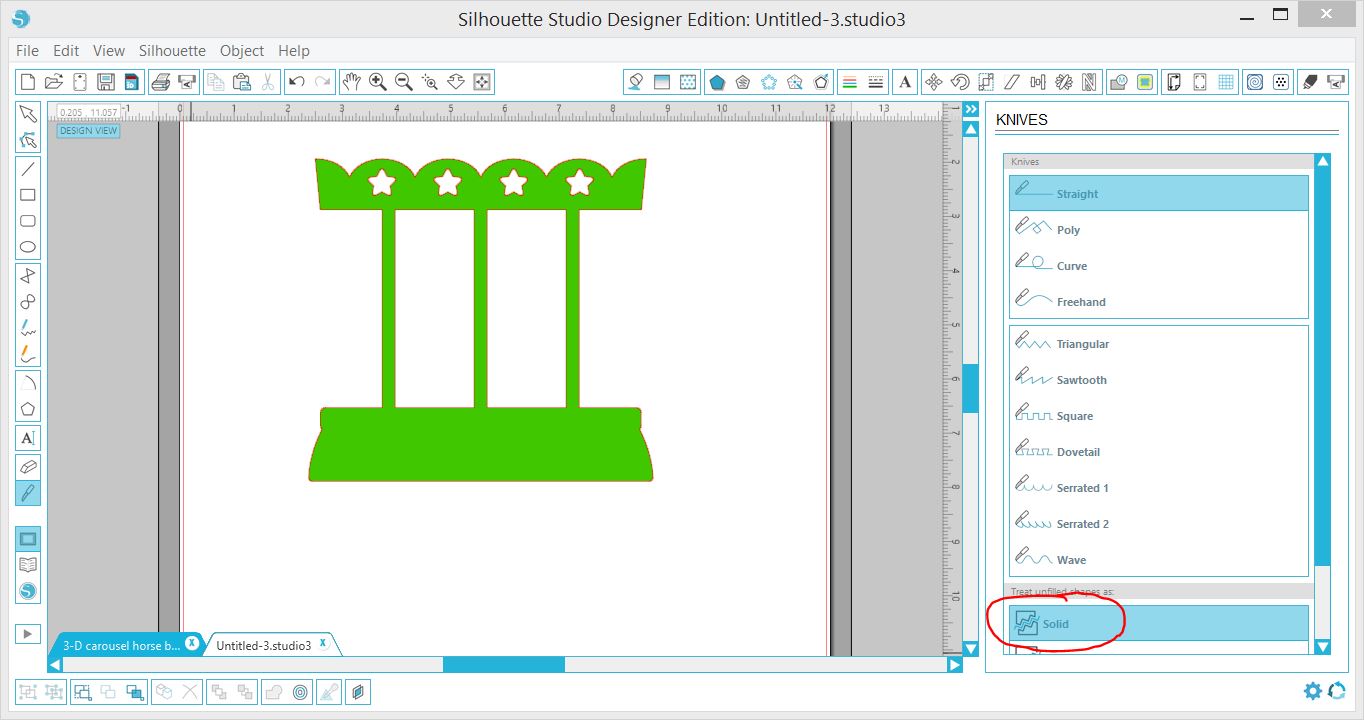
  2. Then use your cut tool, (blue circle) to cut off bottom edge to make shape flat on bottom. Make sure your unfilled shape is toggled to treat as solid.


Once shape is completed replicate as many times as needed.
 
That's it doing less with more focus! Happy Tweaking!
 

Wednesday, January 20, 2016

Weekly Free Download

Silhouette Free Download 1/19/2016

 
For those new silhouette users every week the Silhouette store offers a FREE download pattern.
Sometimes the patterns may not appeal to you as much as others, but especially in the beginning I recommend always downloading them. It will make you familiar with different design ideas, and most pieces can be used in lots of different ways.
 
First let me give credit here to Daniela Moscone she is the amazing designer for this one. I was most surprised by this card because the back flaps double as the cards stand. So this one stands up on it's own. We love that!
 
Then to add just a quick enhancement to the back-side I saved the stars and the rectangles from the front cut. I also used my cutting tool to cut an additional base.
 
1. Duplicate your base. (or copy paste)
2. Select your Cutting Tool
 

3. Make sure your unfilled shape stays as a solid.
4. Hold your shift key while dragging knife across bottom section to cut in straight line.
NOTE: If your new to the knife remember that if you cut a little off simply hit your undo and start again until you get it straight.
Now you have the base and you can delete the upper half. :)
Happy Tweaking...


Saturday, September 13, 2014

Headboard Personalization

A special gift for my Hubby

Previously I posted spice jar labels and that I had a second project in mind for these leaves by Loni Harris. Second Project complete.
 
Head board in our RV, an Everlite by Evergreen.
 
Original post with spice jar project.

Saturday, April 5, 2014

Music Speaks

Music Speaks where words Fail


I think no matter where you find yourself in life this could speak to you. The teenager in his/her room with the music blasting because no one understands them. Maybe you are the young married couple standing singing along in worship Sunday morning where seemingly nothing has gone right between the two of you all week, but as you worship walls are dropped and healing begins. The daily commuter that gets inspiration from travel music. Perhaps your laying in a hospital bed knowing your time served on earth is about to end, or perhaps your the person standing at the side of the bed knowing your loved one is about to leave you. So much of our lives are touched by music.

Music speaks where words fail.


http://silhouettetweaking.blogspot.com/p/layered-picture-frame-matting.html
Do the Tweak